
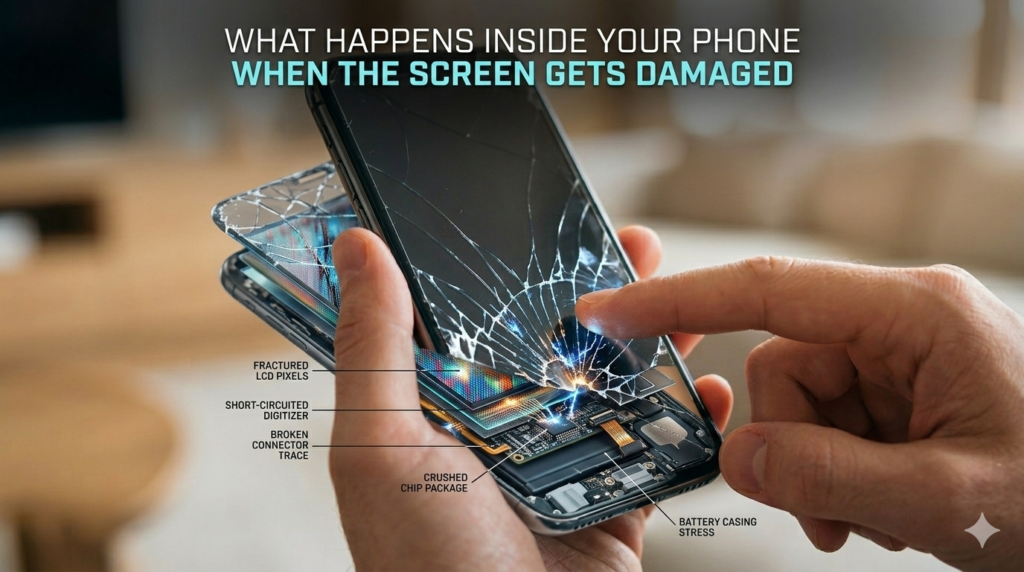
What Happens Inside Your Phone When the Screen Gets Damaged
A smartphone screen is one of the most sensitive and frequently used parts of any device. While many users think a cracked screen is only a cosmetic issue, the truth is far more complex. Beneath the glass surface lies a combination of delicate components that control display clarity, touch sensitivity, and overall device functionality.
When a screen gets damaged, the impact can affect much more than what you see on the surface. Understanding what actually happens inside your phone after screen damage can help you make better decisions about repairs and maintenance. For users searching for reliable iPhone screen repair in East Regina, learning about these hidden issues highlights why timely professional repair is essential.
The Structure of an iPhone Screen
To understand the impact of screen damage, it’s helpful to know how an iPhone screen works. The display is made up of several layers working together:
- Outer Glass Layer – The protective surface that users interact with daily.
- Digitizer Layer – The component that detects touch and converts it into commands.
- Display Panel (LCD or OLED) – Responsible for producing images, colors, and brightness.
When a phone drops or experiences pressure, any of these layers can be affected. Even if the glass crack appears small, internal components may already be compromised.
How Cracks Spread Over Time
A tiny crack in the corner of the screen may not seem serious initially. However, glass fractures naturally spread when exposed to continuous pressure. Every tap, swipe, or slight bend of the device places additional stress on the weakened area.
Over time, cracks can extend across the entire screen. As the damage spreads, the display becomes more fragile and prone to additional problems such as touch failure or display distortion.
This is why many experts recommend early iPhone screen repair in East Regina rather than waiting until the damage becomes severe.
The Risk of Touchscreen Malfunction
One of the first internal components affected by screen damage is the digitizer. This layer is responsible for translating your finger movements into commands that the phone understands.
When the digitizer becomes damaged, users may notice:
- Certain areas of the screen stop responding
- Typing becomes inaccurate
- Apps open without being touched
- Swiping gestures stop working
These problems may begin gradually but worsen quickly if the screen is not repaired.
Professional repair restores the digitizer’s functionality and ensures smooth interaction with your device.
Exposure to Dust and Moisture
Cracks in the glass create small openings that allow dust, moisture, and debris to enter the device. Even minimal exposure can cause internal corrosion or damage sensitive components.
Moisture can lead to several issues, including:
- Flickering display
- Dark spots on the screen
- Reduced brightness
- Internal circuit damage
Reliable repair services like NanoTech Mobile carefully inspect devices during screen replacement to ensure no internal contamination has occurred.
Display Performance Begins to Decline
As internal damage progresses, users often notice a decrease in display quality. The screen may appear dimmer, colors may look dull, or vertical lines may appear across the display.
These problems usually indicate that the display panel has been affected. When this happens, replacing the screen assembly is the most effective solution.
Choosing professional iPhone screen repair in East Regina ensures that high-quality replacement components restore both clarity and brightness.
The Importance of Professional Repairs
Some users attempt DIY screen repairs to save money. While repair kits are widely available, modern smartphones are designed with tightly integrated components that require specialized tools and experience.
Improper installation can lead to several complications:
- Loose screen fitting
- Reduced touch sensitivity
- Damage to internal connectors
- Face ID or sensor malfunction
Professional technicians have the expertise to safely replace screens without risking additional damage. Services like NanoTech Mobile provide careful diagnostics, proper tools, and compatible replacement parts to restore device performance.
Preventing Screen Damage in the Future
While accidents cannot always be avoided, certain precautions can reduce the risk of screen damage:
- Install a tempered glass screen protector
- Use a shock-resistant phone case
- Avoid placing your phone in tight pockets or under heavy objects
- Keep the device away from water and extreme temperatures
These small preventive steps can significantly extend the lifespan of your smartphone display.
Conclusion
A cracked phone screen is more than just a cosmetic problem. Beneath the surface, multiple components may be affected, leading to touch failures, display issues, and internal damage over time. Ignoring these problems often results in more complicated repairs and higher costs later.
Seeking timely professional iPhone screen repair in East Regina ensures your device remains safe, functional, and reliable. With trusted service from NanoTech Mobile, users can restore their phone’s performance while protecting their investment for the long term.
FAQs
1. How do I know if my iPhone screen needs replacement?
If your screen has cracks, dead touch areas, flickering display, or black spots, it likely needs replacement. These symptoms indicate damage to the screen assembly and require professional inspection.
2. Can a cracked iPhone screen cause other problems?
Yes. A cracked screen can allow dust and moisture to enter the device, potentially damaging internal components and causing touch or display issues over time.
3. How long does iPhone screen repair usually take?
Most professional repairs can be completed within a short time depending on the model and damage level. Experienced technicians offering iPhone screen repair in East Regina can typically restore your device quickly and safely.
LEAVE A COMMENT